Send Your Files to Us
To upload files to us, we recommend
HighTail.com.
When you go to
HighTail.com
you will be asked to join. Click on the "Free" option and register. You will be
able to send files up to 50 mb in size and up to 2 gb of files a month.
Once you register, you can send a file immediately by clicking the "Send"
button. This will lead to a form that will direct your file to us.
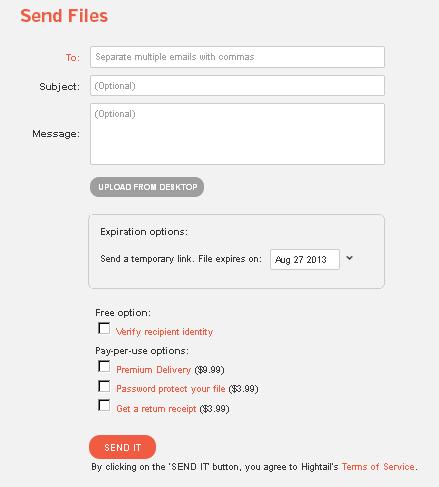
In the "To:" box, fill in our e-mail address:
fantran@aol.com.
In the "Subject" and "Message" boxes fill in some information about the file,
such as who you are, the names of the participants, whether it's part of a
certain project, etc.
We're often receiving files from several clients at the same time, so be sure
to write something in the message area that will allow us to identify who is
sending us a file.
Click on the "Upload from Deskktop" button and a Window will open up that will
allow you to choose the file to send and click "Open." The name of your file
will appear in a box on the page.
You don't need to click any of the additional options and we don't recommend
you pay for any additional services unless you're uploading a lot of files.
Upload only one file at a time and keep the web page open in your browser until
the upload is complete. Closing the browser window will stop the upload.
We will receive an e-mail telling us we have a file with a link to retrieve it.
You file is never publicly available on the Internet.
We also recommend that you send us a copy of your confirmation e-mail or of the
link HighTail.com provides. HighTail.com's e-mail notifications have been known to
get delayed from time to time, and this makes double-sure that we can grab your file
as quickly as possible.
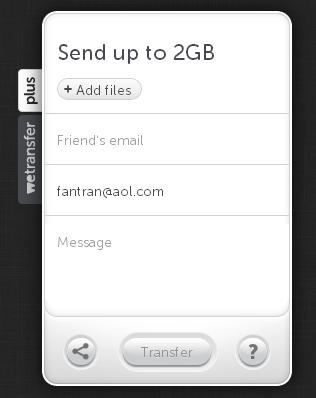
If you have files larger than 50 mb, then we recommend
WeTransfer.com. But
WeTransfer.com's notification e-mails have been known not to arrive at all, so
make very sure you e-mail us the confirmation link. Otherwise the upload proceedure
is similar to HighTail.com.
If you have trouble with
YouSendIt.com or
WeTransfer.com,
you can also try
TransferBigFiles.com or
Verzend.be or your own file transfer
solution.
|